


本文链接: https://blog.csdn.net/lishuangquan1987/article/details/108695472
Redis命令行
下载window下的Redis:
https://github.com/MicrosoftArchive/redis/releases
启动Redis
将下载的Redis解压,解压之后如下所示:
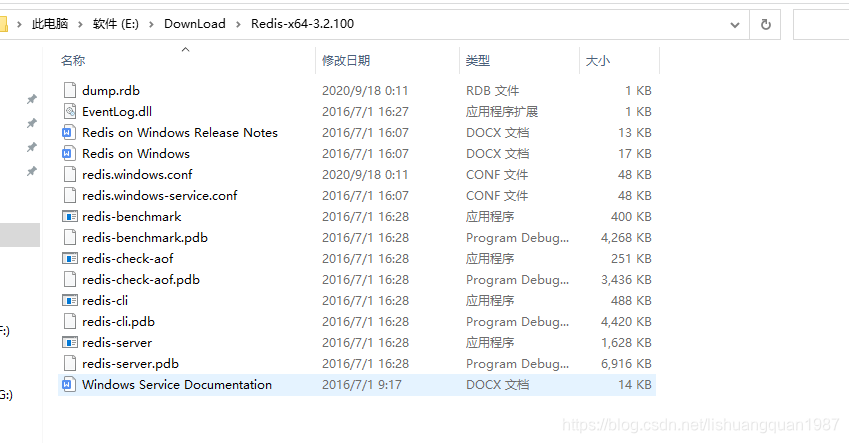
按Windows+R键打开命令行,cd 到Redis的根目录,启动Redis命令:
redis-server.exe redis.windows.conf
其中指定了配置文件是redis.windows.conf
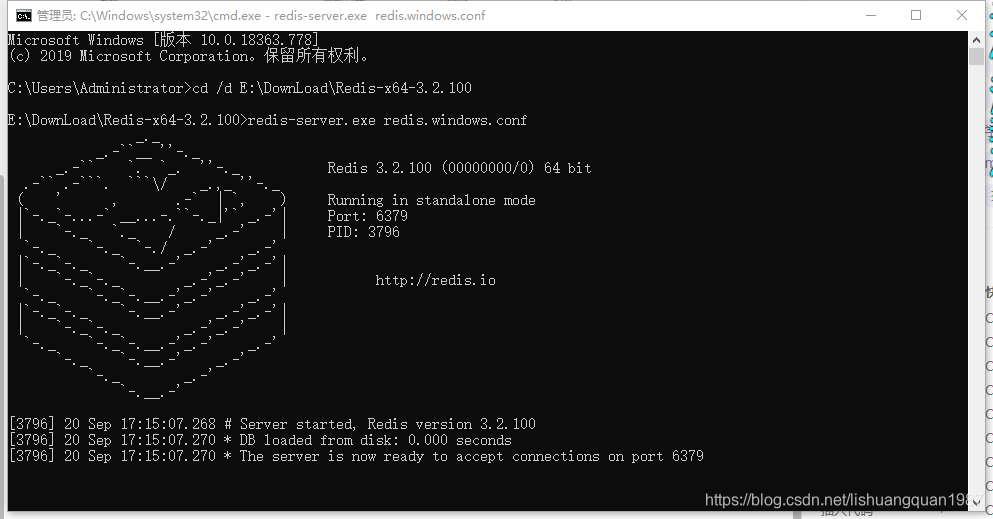
出现了这样的图形,说明redis服务端启动成功
连接Redis
启动另外一个cmd命令控制台,cd 到Reids安装目录,连接Redis服务端:
redis-cli.exe -h 127.0.0.1
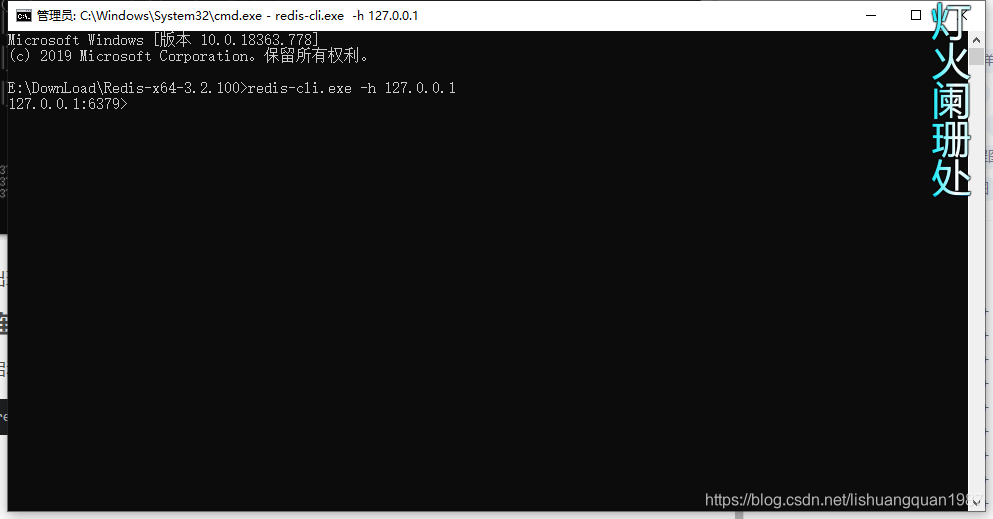
基本命令:
set
set test 123
其中 test 是key,123是值
get
get test
只需要传入要查询的key 就可以了
hset
hset是hashset的意思,比set存储更高效
hset mytest mytest.test 111
第一个mytest是大Key,第二个mytest.test是Field字段,最后111是值
hget
要通过hget获取一个值,需要知道key和field

Redis发布订阅模式
subscribe 订阅具体名字的通道:
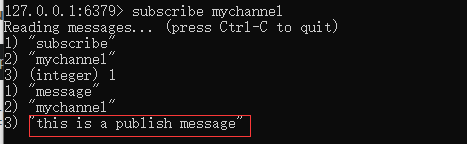
subscribe mychannel

publish 发布消息到具体的通道
publish mychannel "this is a publish message"
其中mychannel就是推送消息的通道,当这个通道有客户端订阅这个消息时,它就会收到消息:
psubscribe 批量订阅消息
这里,需要更改redis的配置,才能接受到消息
打开redis.windows.conf,找到Event Notification,配置 notify-keyspace-events "KAE"
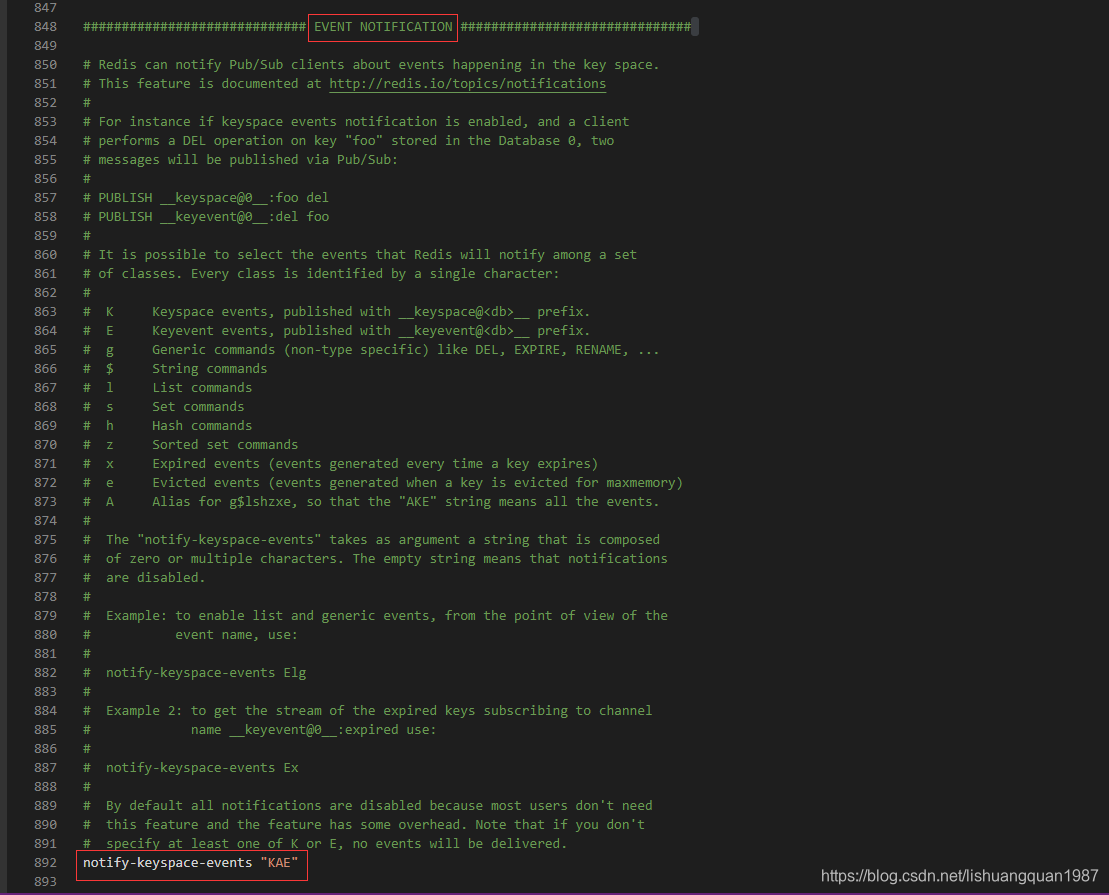
然后重启Reids服务
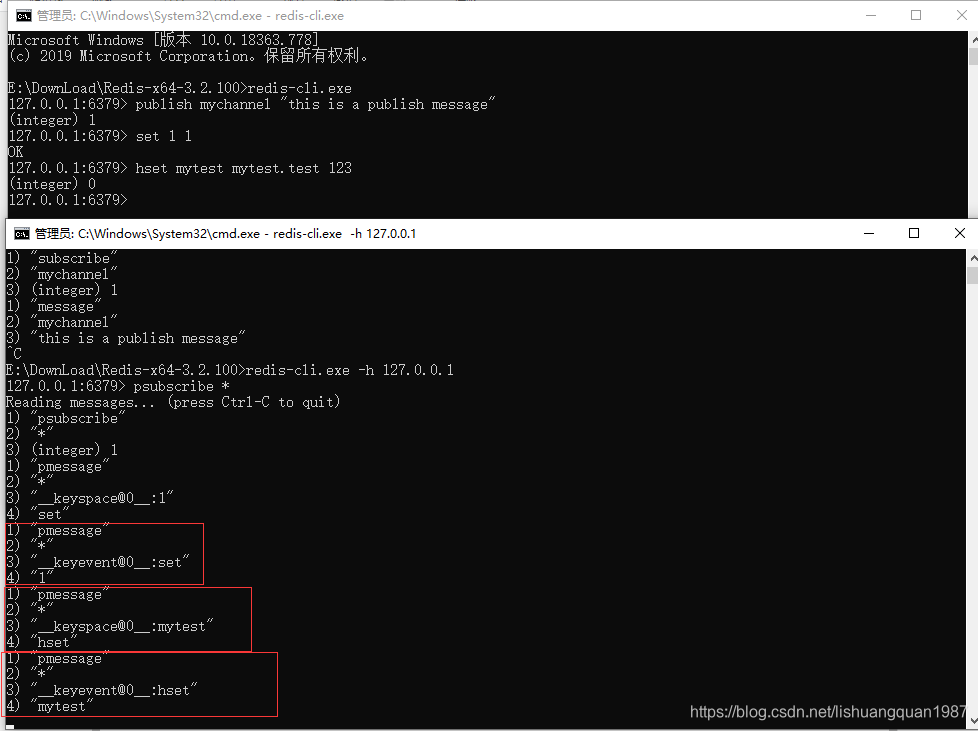
有时候我们想Redis中的值变化,能主动通知客户端,这时候就需要模式匹配通道
希望接收所有的通道消息:
psubscribe *
希望接收所有的set消息:
psubscribe *:set
希望接收所有的hset消息:
psubscribe *:hset
C#连接Redis操作
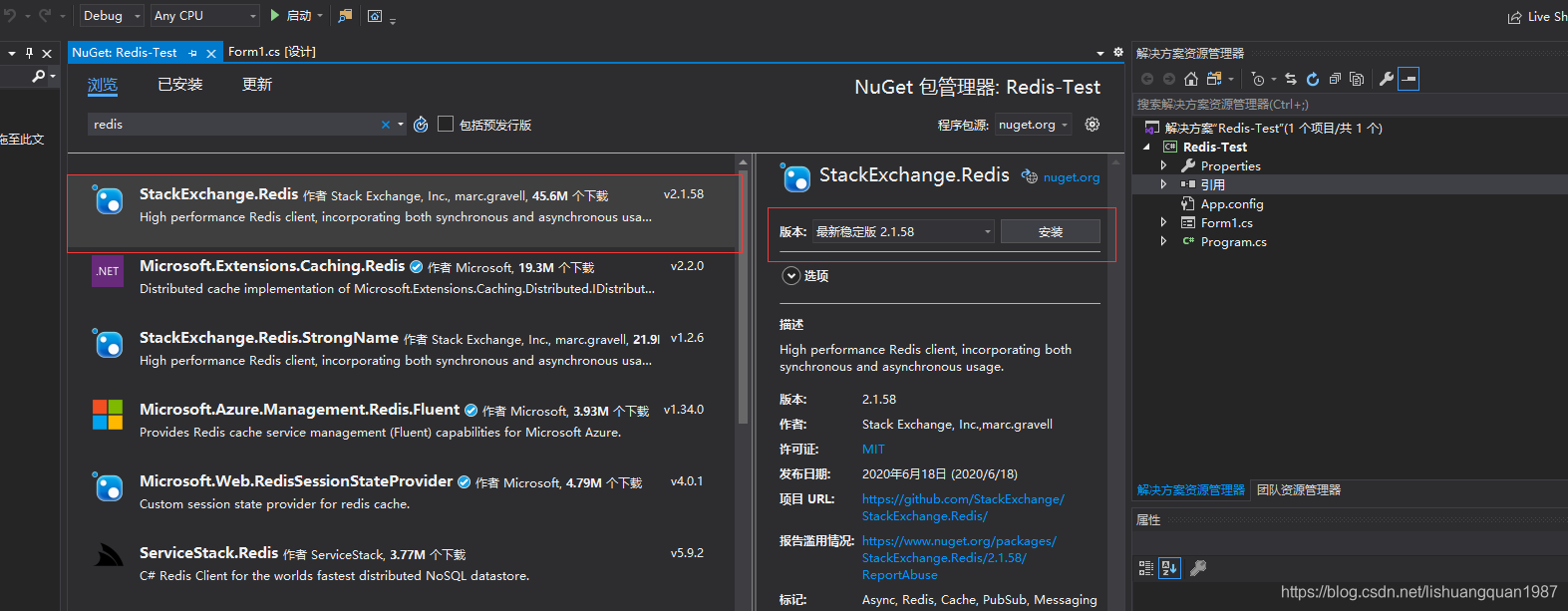
首先建一个Winform的项目,在Nuget中搜索redis,选择StackExchange.Redis:
连接Redis:
_connection = ConnectionMultiplexer.Connect(this.tbIP.Text);
获取Redis的Database
_database = _connection.GetDatabase(0);
订阅Redis消息
var subscibe = _connection.GetSubscriber();
subscibe.Subscribe(this.tb_subscribe_channel.Text, (channel, message) =>
{
    Log($"接收subscribe消息,channel:{channel},message:{message}");
});
这里的通道名称支持模式匹配
最后截图Demo界面如下:
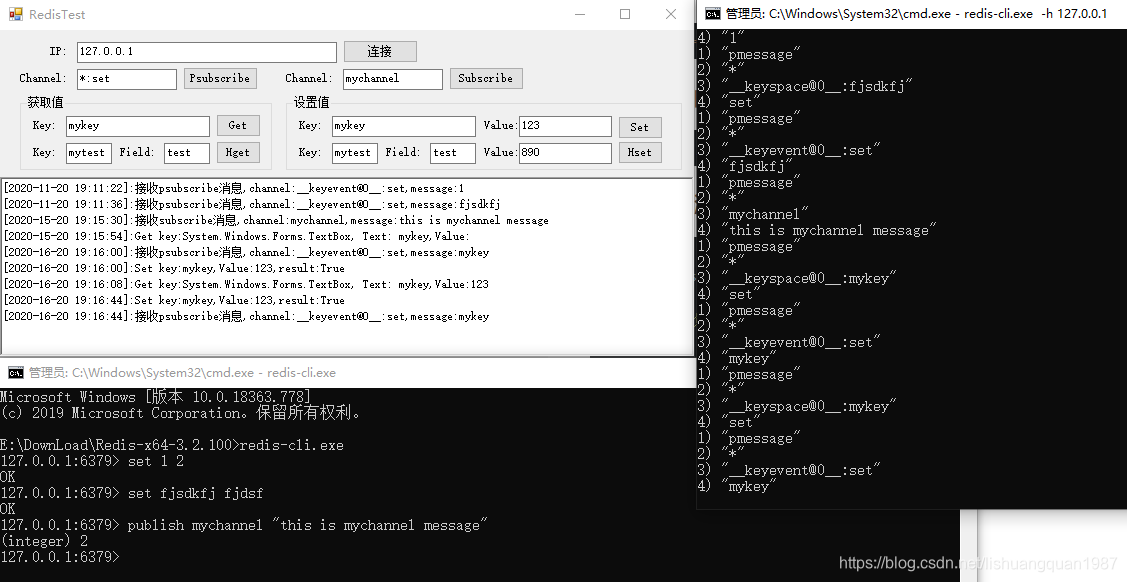
Demo的后台完整代码:
using System;
using System.Collections.Generic;
using System.ComponentModel;
using System.Data;
using System.Drawing;
using System.Linq;
using System.Text;
using System.Threading.Tasks;
using System.Windows.Forms;
using StackExchange.Redis;

namespace Redis_Test
{
    public partial class RedisTest : Form
    {
        ConnectionMultiplexer _connection;
        IDatabase _database;
        public RedisTest()
        {
            InitializeComponent();
            DisableButtons(new List<string>() { nameof(btnConnect)});
        }

        private void btnConnect_Click(object sender, EventArgs e)
        {
            if (string.IsNullOrEmpty(this.tbIP.Text))
            {
                MessageBox.Show("请输入IP地址");
                return;
            }
            try
            {
                _connection = ConnectionMultiplexer.Connect(this.tbIP.Text);
                _database = _connection.GetDatabase(0);//默认使用db0
                EnableButtons(new List<string>());
            }
            catch (Exception ex)
            {
                MessageBox.Show("连接Redis出错:"+ex.Message);
                _connection = null;
                _database = null;
                DisableButtons(new List<string>() { nameof(btnConnect) });
            }
        }
        private void EnableButtons(List<string> exceptButtonNames)
        {
            var controls = FindAllButtons(this);
            controls = controls.Where(x => !exceptButtonNames.Contains(x.Name)).ToList();
            controls.ForEach(x => x.Enabled = true);
        }
        private void DisableButtons(List<string> exceptButtonNames)
        {
            var controls = FindAllButtons(this);
            controls = controls.Where(x => !exceptButtonNames.Contains(x.Name)).ToList();
            controls.ForEach(x => x.Enabled = false);
        }

        private List<Button> FindAllButtons(Control parentControl)
        {
            if (parentControl.Controls == null || parentControl.Controls.Count == 0)
            {
                return new List<Button>();
            }
            List<Button> results = new List<Button>();
            foreach (Control control in parentControl.Controls)
            {
                if (control is Button btn)
                {
                    results.Add(btn);
                }
                else
                {
                    results.AddRange(FindAllButtons(control));
                }
            }
            return results;
        }
        private void btnPsubscribe_Click(object sender, EventArgs e)
        {
            if (string.IsNullOrEmpty(this.tb_psubscribe_channel.Text))
            {
                MessageBox.Show("请输入psubscribe的通道名称或者匹配名称");
                return;
            }
            var subscibe = _connection.GetSubscriber();
            subscibe.Subscribe(this.tb_psubscribe_channel.Text, (channel, message) =>
             {
                 Log($"接收psubscribe消息,channel:{channel},message:{message}");
             });

        }
        private void Log(string msg)
        {
            this.Invoke(new Action(() =>
            {
                this.rtbMsg.AppendText($"[{DateTime.Now.ToString("yyyy-mm-dd HH:mm:ss")}]:{msg}\r\n");
            }));

        }

        private void btnSubscribe_Click(object sender, EventArgs e)
        {
            if (string.IsNullOrEmpty(this.tb_subscribe_channel.Text))
            {
                MessageBox.Show("请输入subscribe的通道名称或者匹配名称");
                return;
            }
            var subscibe = _connection.GetSubscriber();
            subscibe.Subscribe(this.tb_subscribe_channel.Text, (channel, message) =>
            {
                Log($"接收subscribe消息,channel:{channel},message:{message}");
            });
        }

        private void btnGet_Click(object sender, EventArgs e)
        {
            if (string.IsNullOrEmpty(this.tb_Key_Get.Text))
            {
                MessageBox.Show("请输入key");
                return;
            }
            var result = _database.StringGet(this.tb_Key_Get.Text);
            Log($"Get key:{this.tb_Key_Get},Value:{result}");
        }

        private void btnHget_Click(object sender, EventArgs e)
        {
            if (string.IsNullOrEmpty(this.tb_Key_Hget.Text))
            {
                MessageBox.Show("请输入key");
                return;
            }
            if (string.IsNullOrEmpty(this.tb_Field_Hget.Text))
            {
                MessageBox.Show("请输入field");
                return;
            }
            var result = _database.HashGet(this.tb_Key_Hget.Text,this.tb_Field_Hget.Text);
            Log($"HGet key:{this.tb_Key_Hget.Text},field:{this.tb_Field_Hget.Text},Value:{result}");
        }

        private void btnSet_Click(object sender, EventArgs e)
        {
            if (string.IsNullOrEmpty(this.tb_Key_Set.Text))
            {
                MessageBox.Show("请输入key");
                return;
            }
            if (string.IsNullOrEmpty(this.tb_Value_Set.Text))
            {
                MessageBox.Show("请输入Value");
                return;
            }
            var result = _database.StringSet(this.tb_Key_Set.Text,this.tb_Value_Set.Text);
            Log($"Set key:{this.tb_Key_Set.Text},Value:{this.tb_Value_Set.Text},result:{result}");
        }

        private void btnHset_Click(object sender, EventArgs e)
        {
            if (string.IsNullOrEmpty(this.tb_Key_Hset.Text))
            {
                MessageBox.Show("请输入key");
                return;
            }
            if (string.IsNullOrEmpty(this.tb_Value_HSet.Text))
            {
                MessageBox.Show("请输入Value");
                return;
            }
            if (string.IsNullOrEmpty(this.tb_Field_Hset.Text))
            {
                MessageBox.Show("请输入field");
                return;
            }
            _database.HashSet(this.tb_Key_Hset.Text, this.tb_Field_Hset.Text, this.tb_Value_HSet.Text);
            Log($"HSet key:{this.tb_Key_Hset.Text},field:{this.tb_Field_Hset.Text},value:{this.tb_Value_HSet.Text}");
        }
    }
}
Demo下载:
评论区