



本文链接: https://blog.csdn.net/lishuangquan1987/article/details/111093455
WPF中自带的TextBox的外观如下:

现在要把它变成有水印提示的TextBox,并且主题可以改变:
白色主题:

黑色主题:

以下是自定义控件需要考虑的:
1.需要为TextBox增加一个水印属性,并且这个水印属性可以自定义设置
2.黑白风格的颜色样式
水印属性
采用附加属性来给TextBox增加水印属性:
public class TextBoxHelper: DependencyObject
    {

        public static string GetWaterMark(DependencyObject obj)
        {
            return (string)obj.GetValue(WaterMarkProperty);
        }

        public static void SetWaterMark(DependencyObject obj, string value)
        {
            obj.SetValue(WaterMarkProperty, value);
        }

        // Using a DependencyProperty as the backing store for WaterMark.  This enables animation, styling, binding, etc...
        public static readonly DependencyProperty WaterMarkProperty =
            DependencyProperty.RegisterAttached("WaterMark", typeof(string), typeof(TextBoxHelper), new PropertyMetadata("请输入值"));

    }
TextBox的模板中增加水印支持
先把系统的TextBox的模板拿到:
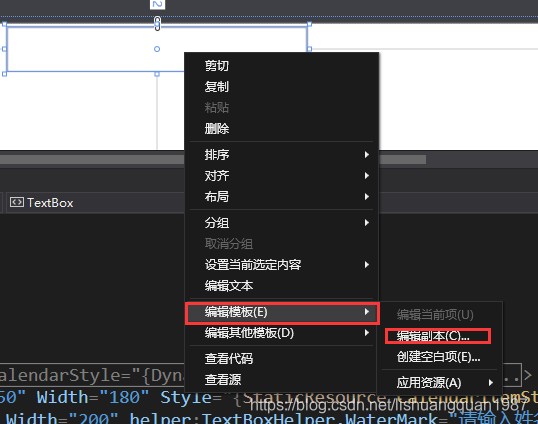
这样我们在系统的模板上更改。
增加水印,其实就是在Border下再增加一个TextBlock,如果TextBox的Text为空,则显示水印,否则不显示。
修改后的模板如下:
其中使用到了 helper:TextBoxHelper.WaterMark 需要引用 xmlns:helper="clr-namespace:MyControls2020.Helper
<Style x:Key="TextBoxStyle1" TargetType="{x:Type TextBox}">
        <Setter Property="Background" Value="{DynamicResource TextBox.BackgroundColor}"/>
        <Setter Property="BorderBrush" Value="{DynamicResource TextBox.NotMouseOver.BorderBrushColor}"/>
        <Setter Property="Foreground" Value="{DynamicResource TextBox.ForegroundColor}"/>
        <Setter Property="BorderThickness" Value="1"/>
        <Setter Property="KeyboardNavigation.TabNavigation" Value="None"/>
        <Setter Property="HorizontalContentAlignment" Value="Left"/>
        <Setter Property="VerticalContentAlignment" Value="Center"></Setter>
        <Setter Property="FocusVisualStyle" Value="{x:Null}"/>
        <Setter Property="AllowDrop" Value="true"/>
        <Setter Property="ScrollViewer.PanningMode" Value="VerticalFirst"/>
        <Setter Property="Stylus.IsFlicksEnabled" Value="False"/>
        <Setter Property="helper:TextBoxHelper.WaterMark" Value="请输入信息"></Setter>
        <Setter Property="CaretBrush" Value="{DynamicResource TextBox.ForegroundColor}"></Setter>
        <Setter Property="Template">
            <Setter.Value>
                <ControlTemplate TargetType="{x:Type TextBox}">
                    <Border x:Name="border" CornerRadius="5" BorderBrush="{TemplateBinding BorderBrush}" BorderThickness="{TemplateBinding BorderThickness}" Background="{TemplateBinding Background}" SnapsToDevicePixels="True">
                        <Grid>
                            <TextBlock Margin="2,0,0,0" VerticalAlignment="Center" Visibility="Collapsed" x:Name="PART_WaterMark" Text="{TemplateBinding helper:TextBoxHelper.WaterMark}" Foreground="{DynamicResource TextBox.WaterMarkColor}"></TextBlock>
                            <ScrollViewer x:Name="PART_ContentHost" Focusable="false" HorizontalScrollBarVisibility="Hidden" VerticalScrollBarVisibility="Hidden"/>
                        </Grid>
                    </Border>
                    <ControlTemplate.Triggers>
                        <Trigger Property="IsEnabled" Value="false">
                            <!--<Setter Property="Opacity" TargetName="border" Value="0.56"/>-->
                            <Setter TargetName="border" Property="BorderBrush" Value="{DynamicResource TextBox.NotMouseOver.BorderBrushColor}"></Setter>
                        </Trigger>
                        <Trigger Property="IsMouseOver" Value="true">
                            <Setter Property="BorderBrush" TargetName="border" Value="{DynamicResource TextBox.MouseOver.BorderBrushColor}"/>
                        </Trigger>
                        <Trigger Property="IsKeyboardFocused" Value="true">
                            <Setter Property="BorderBrush" TargetName="border" Value="{DynamicResource TextBox.MouseOver.BorderBrushColor}"/>
                        </Trigger>
                        <Trigger Property="Text" Value="">
                            <Setter TargetName="PART_WaterMark" Property="Visibility" Value="Visible"></Setter>
                        </Trigger>
                    </ControlTemplate.Triggers>
                </ControlTemplate>
            </Setter.Value>
        </Setter>
        <Style.Triggers>
            <MultiTrigger>
                <MultiTrigger.Conditions>
                    <Condition Property="IsInactiveSelectionHighlightEnabled" Value="true"/>
                    <Condition Property="IsSelectionActive" Value="false"/>
                </MultiTrigger.Conditions>
                <Setter Property="SelectionBrush" Value="{DynamicResource {x:Static SystemColors.InactiveSelectionHighlightBrushKey}}"/>
            </MultiTrigger>
        </Style.Triggers>
    </Style>
关键点:
 <Trigger Property="Text" Value="">
  <Setter TargetName="PART_WaterMark" Property="Visibility" Value="Visible"></Setter>
 </Trigger>
这一句触发器,控制了水印的显示与隐藏
上面用到了几个颜色样式,需要在黑白风格中去定义它们:
白色风格:
<ResourceDictionary xmlns="http://schemas.microsoft.com/winfx/2006/xaml/presentation"
                    xmlns:x="http://schemas.microsoft.com/winfx/2006/xaml"
                    xmlns:local="clr-namespace:MyControls2020">

    <SolidColorBrush x:Key="Basic.Window.BackgroundColor" Color="White"></SolidColorBrush>
    <SolidColorBrush x:Key="Basic.ForegroundColor" Color="Black"></SolidColorBrush>


    <!--#region  TextBox-->
    <SolidColorBrush x:Key="TextBox.BackgroundColor" Color="Transparent"></SolidColorBrush>
    <SolidColorBrush x:Key="TextBox.ForegroundColor" Color="Black"></SolidColorBrush>
    <SolidColorBrush x:Key="TextBox.MouseOver.BorderBrushColor" Color="Blue" Opacity="0.5"></SolidColorBrush>
    <SolidColorBrush x:Key="TextBox.NotMouseOver.BorderBrushColor" Color="Gray"></SolidColorBrush>
    <SolidColorBrush x:Key="TextBox.WaterMarkColor" Color="Gray"></SolidColorBrush>
    <!--#endregion-->
</ResourceDictionary>
黑色风格
<ResourceDictionary xmlns="http://schemas.microsoft.com/winfx/2006/xaml/presentation"
                    xmlns:x="http://schemas.microsoft.com/winfx/2006/xaml"
                    xmlns:local="clr-namespace:MyControls2020">

    <SolidColorBrush x:Key="Basic.Window.BackgroundColor" Color="Black"></SolidColorBrush>
    <SolidColorBrush x:Key="Basic.ForegroundColor" Color="White"></SolidColorBrush>


    <!--#region  TextBox-->
    <SolidColorBrush x:Key="TextBox.BackgroundColor" Color="Transparent"></SolidColorBrush>
    <SolidColorBrush x:Key="TextBox.ForegroundColor" Color="White"></SolidColorBrush>
    <SolidColorBrush x:Key="TextBox.MouseOver.BorderBrushColor" Color="#FF16ECE2" Opacity="0.5"></SolidColorBrush>
    <SolidColorBrush x:Key="TextBox.NotMouseOver.BorderBrushColor" Color="Gray"></SolidColorBrush>
    <SolidColorBrush x:Key="TextBox.WaterMarkColor" Color="Gray"></SolidColorBrush>
    <!--#endregion-->
</ResourceDictionary>
注意:两个颜色样式的字典中的KEY值必须完全一样!!!
使用自定义的TextBox
<Window x:Class="MyControls2020.Window_Black"
        xmlns="http://schemas.microsoft.com/winfx/2006/xaml/presentation"
        xmlns:x="http://schemas.microsoft.com/winfx/2006/xaml"
        xmlns:d="http://schemas.microsoft.com/expression/blend/2008"
        xmlns:mc="http://schemas.openxmlformats.org/markup-compatibility/2006"
        xmlns:local="clr-namespace:MyControls2020"
        xmlns:helper="clr-namespace:MyControls2020.Helper"
        mc:Ignorable="d"
        Title="Window_Black" Height="450" Width="800" Background="{DynamicResource Basic.Window.BackgroundColor}">
    <Window.Resources>
        <ResourceDictionary>
            <ResourceDictionary.MergedDictionaries>
                <ResourceDictionary Source="BlackStyle.xaml"></ResourceDictionary>
                <ResourceDictionary Source="TextBox.xaml"></ResourceDictionary>
            </ResourceDictionary.MergedDictionaries>
        </ResourceDictionary>
    </Window.Resources>
    <Grid>
        <TextBox Height="30" Width="200" helper:TextBoxHelper.WaterMark="请输入姓名" Style="{DynamicResource TextBoxStyle1}"></TextBox>
    </Grid>
</Window>
这两个资源字典
<ResourceDictionary Source="BlackStyle.xaml"></ResourceDictionary>
<ResourceDictionary Source="TextBox.xaml"></ResourceDictionary>
是上面定义的黑色颜色样式和TextBox的模板,使用的时候需要引用
helper:TextBoxHelper.WaterMark="请输入姓名" 便是使用附加属性来设置TextBox的提示水印
评论区